
Run, track, and repeat your team's most crucial work.
Drill gives you the capabilities you need to run operations at scale, without the complexity.

Features At-A-Glance
Simple participant experience
The people doing the work never need to learn a new software.
No accounts required
Mobile-first
SMS and Email driven
Manager Insights
Know what's done and what's next without asking.
Live status for every Drill
Overdue and behind schedule items
Full activity history
Drill workflow engine
The right step goes to the right person at the right time, automatically.
No accounts required
Mobile-first
SMS and Email driven
Your brand, not ours
Drill is embeddable and white-label for brand conscious organizations and enterprise implementations.
Your logo and colors
Embed right in your existing application
Seamless experience for clients and contractors
For Participants
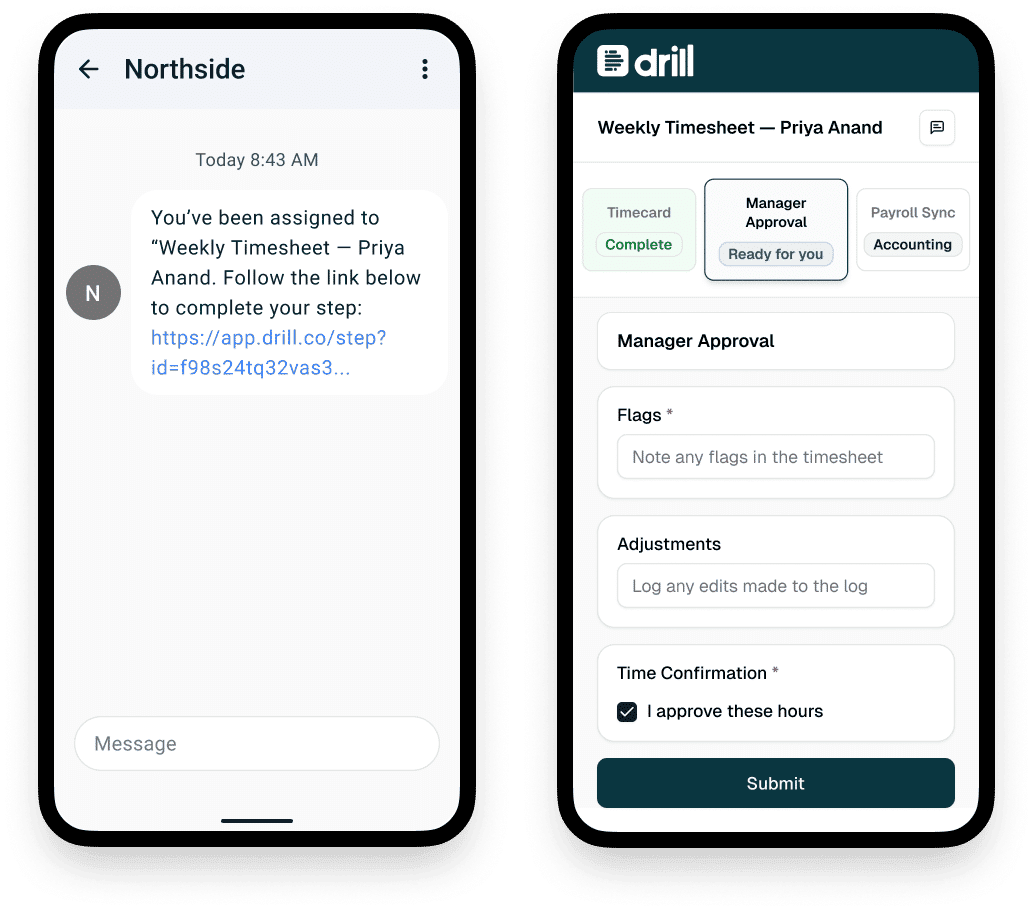
Just tap and go.
A text arrives with one clear step. Open and fill it out to complete. No password, no app, no training.
FOR MANAGERS
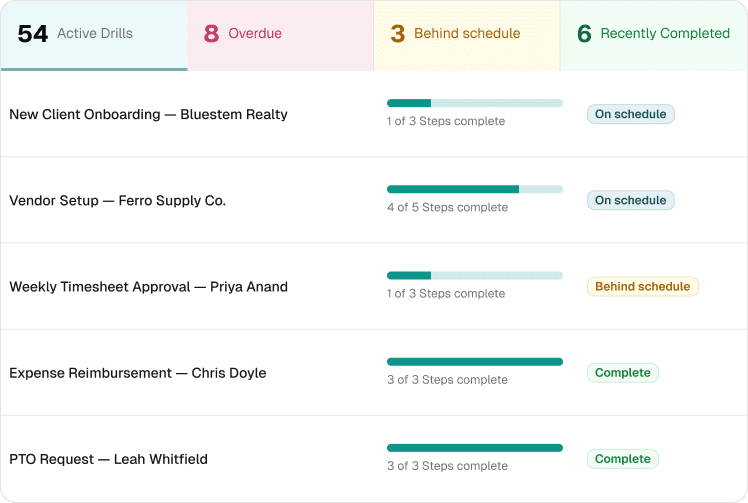
Every Drill at a Glance
One dashboard shows every person, every step, and every status. Overdue and behind-schedule Drills rise to the top so you know where to step in.
Step in when it matters
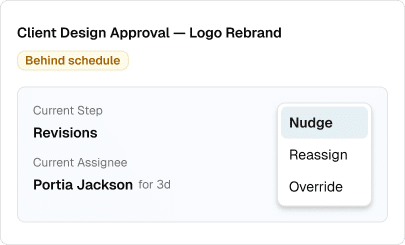
Keep things moving.
Reassign a step, send a nudge, or override in one click. Every action is recorded in the Drill history.
Send at Scale
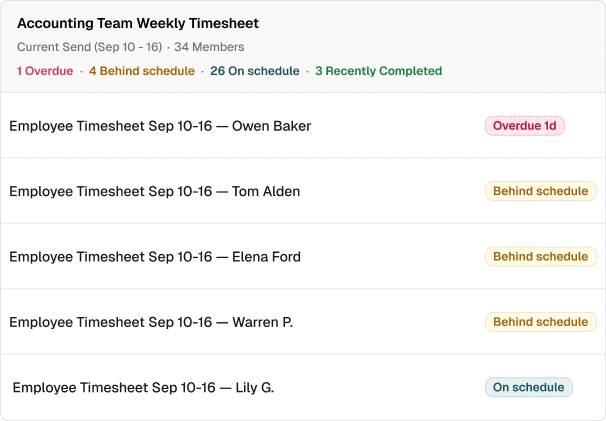
Send a whole batch
Send the same template to your entire team at once. Each person gets their own Drill and you can track them all together.
Built For Teams Like Yours

Real Estate

HR & People Ops

Events & Projects

Trades and Franchises
Start free. Upgrade when ready.
Free
$0 / month
Unlimited Users
Unlimited Templates
First 500 Step Completions Free
50 Completions Per Month
90 Day History
Public Forum Support
Basic
$99 / month
Unlimited Users
Unlimited Templates
500 Step Completions Per Month
($.05 per Step Completion Overage)
1 Year History
1GB Storage
Pro
$499 / month
Unlimited Users
Unlimited Templates
Unlimited Steps per template
($.01 per Step Completion Overage)
Unlimited History
Unlimited Storage
Premium Templates
Ticket Support
Example Uses
Common Cross-Industry Workflows
Employee onboarding
(HR → IT → training → manager tasks)
Employee offboarding
(Access removal → equipment → payroll → documentation)
Vendor or contractor onboarding
(Contracts → compliance → access → assignment)
Incident or issue resolution
(Report → investigate → assign → resolve → record)
Purchase requests & approvals
(Request → approve → order → receive → reconcile)
Compliance or audit preparation
(Collect → review → fix gaps → submit)
Recurring operational checklists
(Daily / weekly / monthly critical tasks)
Client onboarding
(Contract → intake → setup → handoff)
Asset or equipment lifecycle
(Request → assign → maintain → retire)
Event Managers
Event Planning Kickoff
(Client approval → venue → vendors → timeline → launch)
Vendor Onboarding
(Contracts → insurance → schedules → assignments)
Day-Of Execution
(Check-in → sessions → catering → closeout)
Manufacturing & Warehousing
Preventive maintenance cycles
(Schedule → perform → verify → log)
Production changeover
(Shutdown → retool → QA → restart)
Quality issue response
(Detect → isolate → correct → document)
Supplier onboarding
(Certifications → contracts → access)
Safety incident reporting
(Report → investigate → corrective actions)
Professional Services & Agencies
Client onboarding
(Contract → intake → access → kickoff)
Project kickoff checklist
(Resources → tools → approvals)
Review and approval cycles
(Draft → review → revise → approve)
Contractor onboarding
(Contract → access → billing setup)
Invoice approval
(Submit → review → approve → pay)
Real Estate & Property Management
Unit turnover / make-ready
(Move-out → inspection → cleaning → repairs → ready to rent)
Maintenance request handling
(Tenant report → triage → assign → complete → document)
New tenant onboarding
(Lease → utilities → keys → welcome packet)
Vendor onboarding
(Insurance → contracts → work orders)
Embed in Your App
User Onboarding
(Sign up → collect required data → verify → approve → activate account)
Application or Intake Flow
(Submit request → validate information → review → decision → notify applicant)
Multi-Party Approval
(Request initiated → reviewer approval → secondary approval → finalize)
Compliance Checklist
(Trigger event → assign checklist → complete steps → verify → archive)
Incident or Issue Resolution
(Report issue → triage → assign owner → resolve → document outcome)
Partner or Vendor Enablement
(Invite partner → collect documents → verify → grant access)
Recurring Operational Task
(Schedule trigger → notify participant → complete task → confirm → repeat)
Start with a Template
The Drill template library gives you a head start on some of the most common Drill's for specific industries.
Frequently Asked Questions
Do participants need an account?
No. They can act from the links sent by text or email. However, an account is at any time to take advantage of more features in the dashboard, including tracking completed work.
What's the difference between a template, a Drill, and a batch?
Templates are processes you build once. A Drill is what you send to individuals to complete based on your template. A batch is a group of Drills send together to multiple users.
Can I use Drill with people outside my company?
That's part of what makes Drill so unique. Use it inside your company and loop in people outside. No extra fees. No account. Just cross-organizational work made easy.
How does pricing work?
Start for free. Plans are based on step completions so you can upgrade when you're getting value from the system, not when you add another user.
Can Drill write my template for me?
Yes. Describe your process and AI will draft a template you can customize.